
NGINX 响应头安全配置可参考示例:https://developer.mozilla.org/zh-CN/docs/Web/HTTP/Guides/Cookies#%E9%99%90%E5%88%B6%E8%AE%BF%E9%97%AE_cookie
NGINX 安全配置
注意:你的最大的文件nginx.conf 如果配置的 include /xxxx/*.conf,同时你把我们的安全配置,放到被引入文件的同级。则你会遇到报错:
nginx: [emerg] "set" directive is not allowed here in /Users/zanglikun/dev/nginx-conf/security-headers.conf:32
这个意思不是我们的NG安全的配置文件有误,而是,你直接让nginx.conf文件,直接加载我们的安全配置,就会报错哦。两种解决办法:
1、创建一个文件夹,把我们的配置文件路径丢进去
/Users/zanglikun/dev/nginx-conf/security-headers.conf
改为:
/Users/zanglikun/dev/nginx-conf/你随便创建一个文件夹/security-headers.conf
2、改nginx.conf 的include 不要使用 *.conf
报错二

说明你的配置会遇到 你外部文件引入的问题
创建一个文件 ng-security-headers.conf
# 可见于 https://developer.mozilla.org/en-US/docs/Web/HTTP/Reference/Headers/Set-Cookie
proxy_cookie_path / "/; HttpOnly; Secure; SameSite=Strict";

# ================== 处理预检请求(OPTIONS) ==================
# 对于预检请求直接返回 204,无内容
if ($request_method = 'OPTIONS') {
    # 204 No Content
    return 204;
}


# ================== NGINX安全相关响应头配置 ==================
# 关闭NG版本号码 同时关闭响应头、404页面、502页面 的 NG版本号。(此配置建议NG全局加,而不是仅在本处使用)
server_tokens off;


# 内容安全策略,限制资源加载源
add_header Content-Security-Policy "default-src 'self' data: *.zanglikun.com *.ff11sf.com 'unsafe-inline' 'unsafe-eval' mediastream:";
# 强制使用 HTTPS,最长两年
add_header Strict-Transport-Security "max-age=63072000; includeSubdomains; preload";
# 控制 Referrer 信息只发送 origin
add_header Referrer-Policy "origin";
# 此配置似乎针对现代应用程序不生效。主要是针对 Flash 和 Adobe AIR 应用程序的。只允许主策略跨域
add_header X-Permitted-Cross-Domain-Policies "master-only";
# 限制下载来源
add_header X-Download-Options "sameorigin" always;
# 防止页面被嵌入到其他站点
add_header X-Frame-Options "SAMEORIGIN";
# 禁止浏览器自动识别内容类型,防止类型混淆攻击
add_header X-Content-Type-Options "nosniff" always;
# 启用 XSS 防护
add_header X-XSS-Protection "1; mode=block";

# 全局Cookie开启 HttpOnly、 Secure、SameSite
# proxy_cookie_path / "/; HttpOnly; Secure; SameSite=Strict";


# ================== 隐藏后端 CORS 头部 ==================
# 隐藏后端返回的跨域相关头部,防止信息泄露
proxy_hide_header Access-Control-Allow-Origin;
proxy_hide_header Access-Control-Allow-Methods;


# ================== 动态根据用户的源来设置响应头Access-Control-Allow-Origin ==================
# 初始化变量,默认不允许跨域
set $allow_origin '';

# 根据内置的域名 来源动态设置 Access-Control-Allow-Origin
if ($http_origin ~* (https?://(.*\.)?(zanglikun\.com|ff11sf\.com)$)) {
    # add_header Access-Control-Allow-Origin $http_origin always;
    set $allow_origin $http_origin;
}

# 如果 $allow_origin 为空,返回 403 Forbidden
if ($allow_origin = '') {
    set $allow_origin $remote_addr;
    # return 403;
}


# ================== 设置 CORS 响应头 ==================
# 设置 CORS 头部
# 返回允许的 Origin
add_header 'Access-Control-Allow-Origin' $allow_origin always;
# 允许的 HTTP 方法
add_header 'Access-Control-Allow-Methods' 'GET, POST, PUT, DELETE, OPTIONS' always;
# 允许的请求头
add_header 'Access-Control-Allow-Headers' 'Content-Type, Authorization' always;
局部使用
location / {
       proxy_pass https://www.baidu.com/;
       include /data/nginx-conf/ng-security-headers.conf;
}
内网配置可参考 Access-Control-Allow-Origin
# ================== 动态设置允许的 Origin ==================
# 初始化变量,默认不允许跨域
set $allow_origin '';

if ($http_origin = 'http://192.168.0.200') {
    set $allow_origin 'http://192.168.0.200';
}

if ($http_origin = 'http://192.168.0.100') {
    set $allow_origin 'http://192.168.0.100';
}

# 如果 $allow_origin 为空,返回 403 Forbidden
if ($allow_origin = '') {
    set $allow_origin $remote_addr;
    # return 403;
}

# ================== 设置 CORS 响应头 ==================
# 设置 CORS 头部
# 返回允许的 Origin
add_header 'Access-Control-Allow-Origin' $allow_origin always;
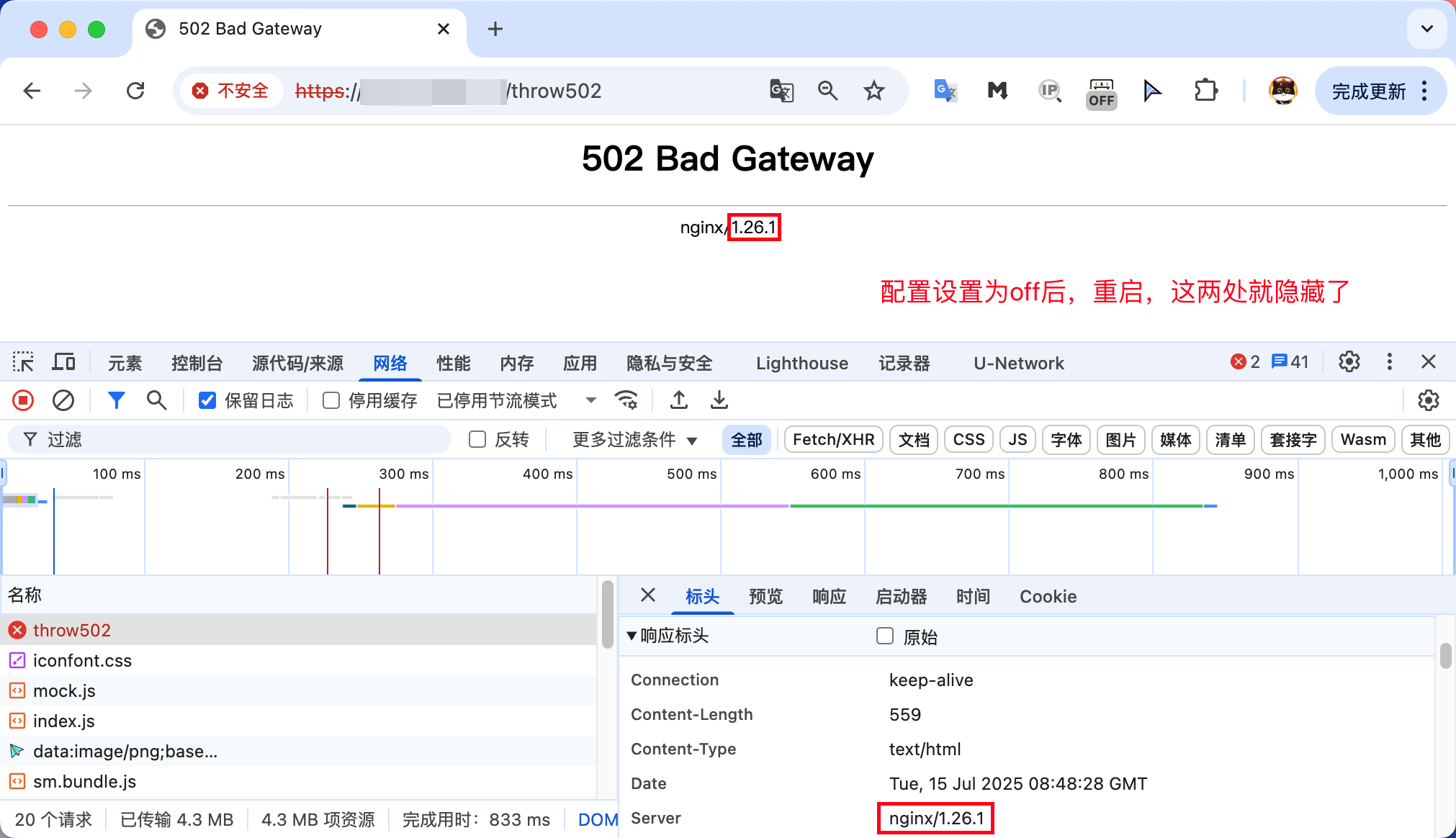
NG版本号隐藏验证
	location /throw502 {
		return 502;
	}
你自己访问这个地址,就能看到了。
响应头也会隐藏。
特殊说明:
上述文章均是作者实际操作后产出。烦请各位,请勿直接盗用!转载记得标注原文链接:www.zanglikun.com
第三方平台不会及时更新本文最新内容。如果发现本文资料不全,可访问本人的Java博客搜索:标题关键字。以获取最新全部资料 ❤
免责声明: 本站文章旨在总结学习互联网技术过程中的经验与见解。任何人不得将其用于违法或违规活动!所有违规内容均由个人自行承担,与作者无关。
第三方平台不会及时更新本文最新内容。如果发现本文资料不全,可访问本人的Java博客搜索:标题关键字。以获取最新全部资料 ❤
免责声明: 本站文章旨在总结学习互联网技术过程中的经验与见解。任何人不得将其用于违法或违规活动!所有违规内容均由个人自行承担,与作者无关。
